

Zero trust for email. Solved.
Threats and unwanted noise aren't just filtered out. They never cross the trust boundary to begin with.
Not a better filter. A different philosophy entirely.
Zero trust, with a head start
On day one, Shield™ builds an initial trust network for each user based on their existing contacts and communication history.
Not everyone gets through
Every new sender starts outside that trust network. One click decides who earns a place inside or gets silenced for good.
Until email is just email again
Shield learns, adapts, and fades into the background. Email stops feeling like a threat and a chore. You may even start to like it.
The trusted sender list lets you see who's in and who's out.
Capabilities you won't find anywhere else
Security signals that move with you
The Heads-Up Display delivers glanceable, color-coded security insights that update as you work so you're always in the know.
See insights in motionSecurity findings made human
X-ray lets you safely interact with any email while revealing what's really happening behind the scenes—explained in plain English.
See inside every email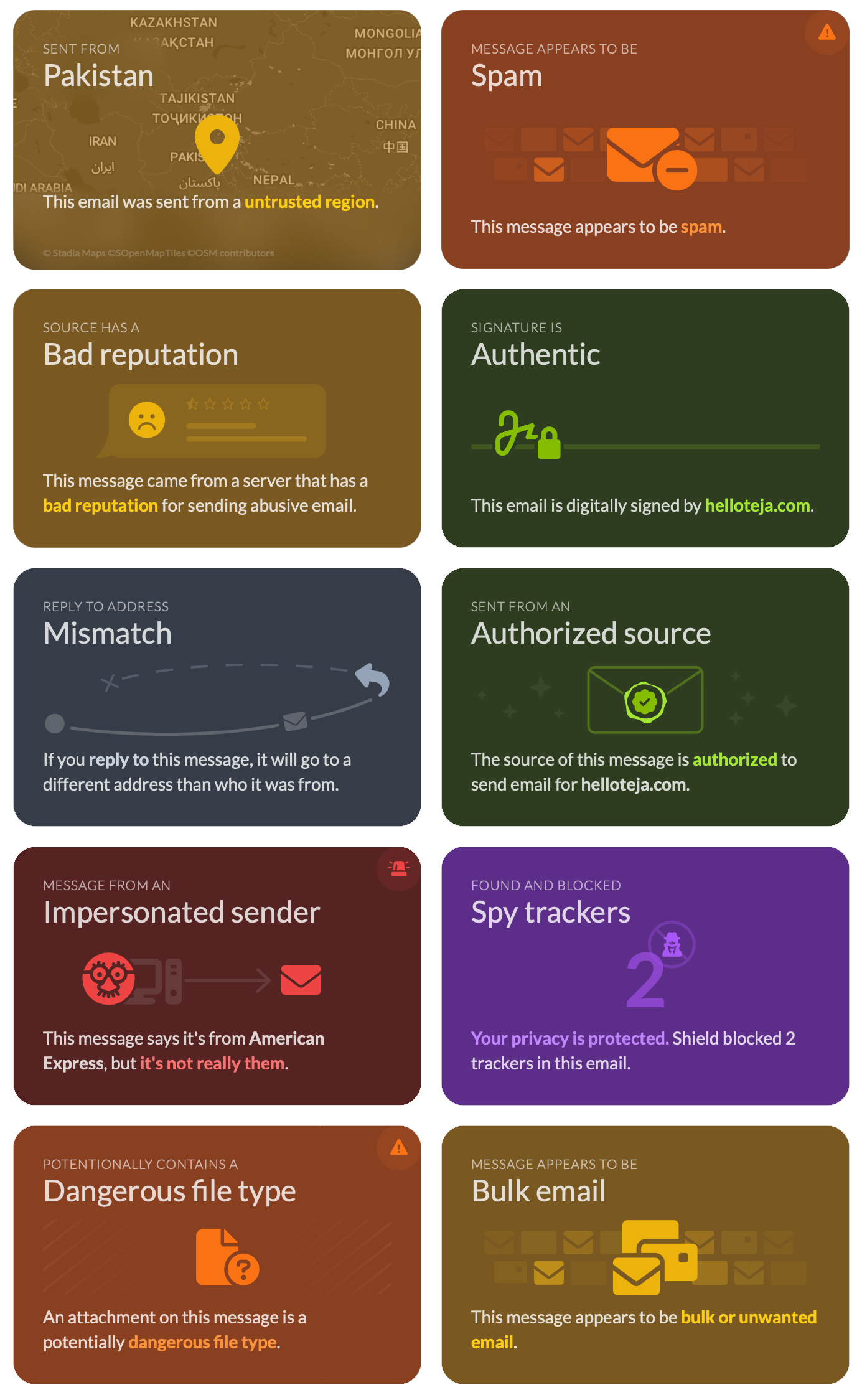
A control tower for the inbox
Email Traffic Control gives administrators point-and-click control over how email moves without writing a single line of code.
Stop reacting and start directing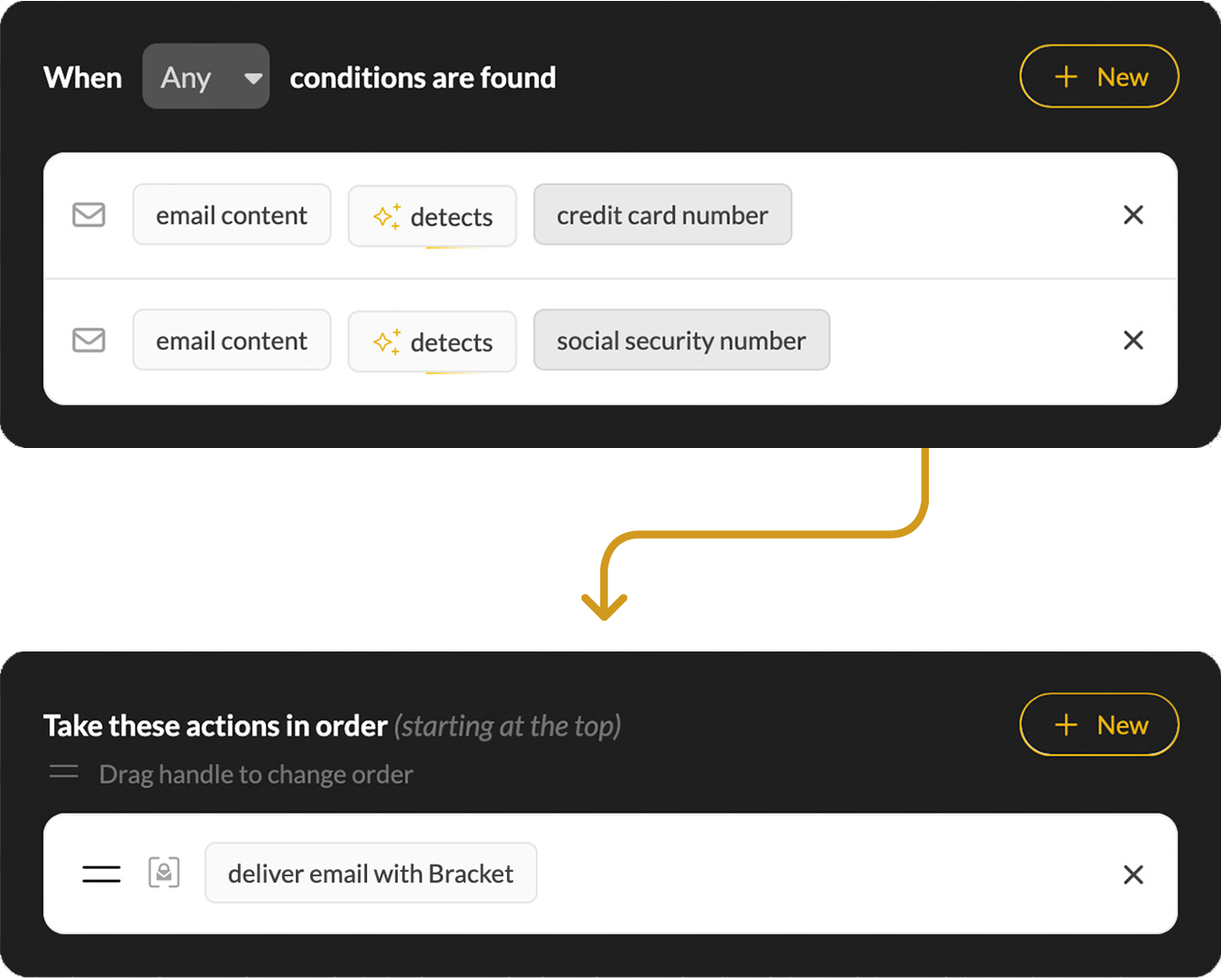
Because some emails can wait
Bundler collects non-urgent messages and holds them until you're ready, so your inbox stays focused on what matters right now.
Give your inbox some breathing room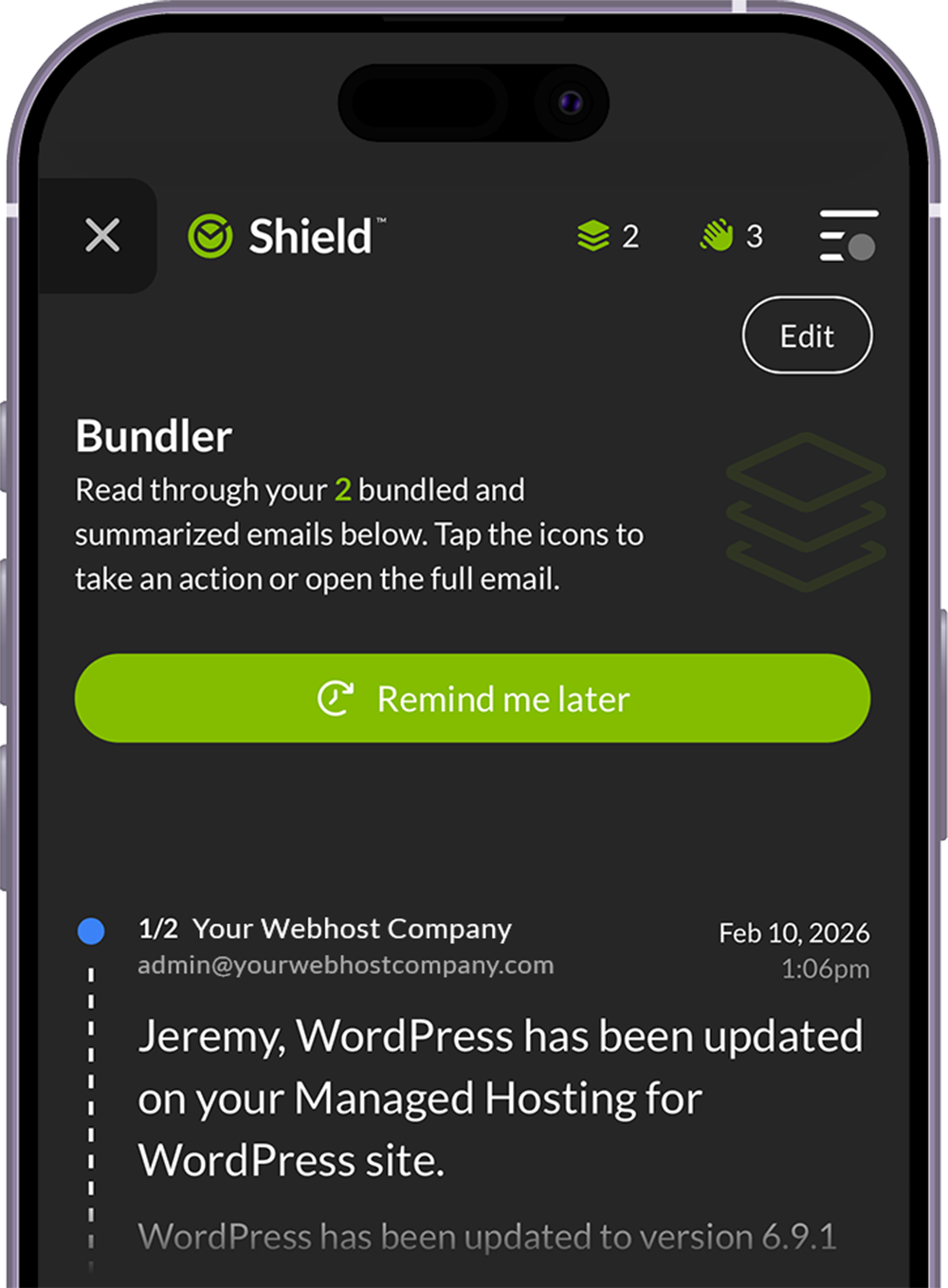
Not all email security is created equal
The architecture matters as much as the features.
Gateway Only
Filters email at the perimeter.
- Established technology
- Stops threats before delivery
- Works with any mail server
- Single point of inspection
- Limited post-delivery visibility
- MX record changes required
API Only
Scans the mailbox after delivery.
- No MX record changes
- Post-delivery remediation
- Easy deployment
- Threats may reach inbox first
- Subject to platform API changes and limits
- Still maturing as a category
Shield: All-In-One
The best of gateway and API protection combined.
- Complete edge-to-inbox coverage
- Threats stopped in every direction
- Zero trust foundation
- Learns from real behavior
- Simple, guided deployment
- MX record changes optional
- Built on 20+ years of expertise
Start with security. Go further when you're ready.
Everything you need to protect your clients—out of the box, from day one.
- Zero trust foundation → the strongest defense possible
- Trust or silence → choose who gets through with one click
- Behavioral intelligence → personalizes as it learns
- Protection in every direction → inbound, outbound, and internal
- Programmable email control → no rules to write or maintain
- Real email learning → no phishing simulations required
Shield Pro gives you all of Shield's security features plus productivity and privacy tools.
Focus on what matters now
Non-urgent mail waits in its own space. AI-generated summaries help you get the gist quickly.
Lock sensitive messages right in your inbox
Even if your account is compromised, only your identity confirmation can reveal its contents.
Create and dispose of addresses on the fly
Perfect for temporary use, like events or online signups. You control how messages are handled.
Zero trust. Zero doubts.
Every time users go into X-ray, it shows them exactly why something might be suspicious and teaches better security habits in real-time. It's organic security awareness training.

Shield applies AI technology in a really unique, impressive way. It looks at all my messages and adapts what's delivered based on my specific tendencies and preferences.

We haven't had a single instance of anything getting through with malicious links, phishing attempts, or impersonations. Shield blocks everything we don't want while letting through what we do.

Frequently Asked Questions
Does Shield use AI?
Yes. Shield uses AI in specific and deliberate ways, like generative AI for email summaries in Bundler. Shield also uses multiple layers of established technology—heuristic pattern matching, machine learning, and behavioral analysis—to infer risk signals from every message. But these are simply components doing specific jobs within a greater system. That system is Shield’s zero trust architecture—the foundation everything sits on top of, and what makes Shield fundamentally different from every other email security product.
So when you hear competitors say “AI-powered,” know that they’re likely describing the same tech that’s been in email filtering for years, just rebranded as AI became a marketing buzzword. Shield’s differentiation isn’t the AI. It’s the zero trust architecture that AI supports—a foundation no amount of rebranding can replicate.
How does the zero trust model actually work?
Shield starts with zero trust and employs a multi-tiered decision engine to determine what reaches the inbox. The first layer targets high-risk threats—phishing, spoofing, malware, impersonation—and stops them before they ever have a chance. Messages that clear that layer fall to the trust network, where Shield applies each user’s personalized preferences to ensure wanted mail gets through. The third layer catches unwanted noise: messages that aren’t threats but aren’t wanted either. What’s left is tagged with a New Sender banner where users make their own trust/silence decisions. Each interaction sharpens the trust network, and Shield quietly fades into the background.
Does Shield have a quarantine?
Not in the traditional sense. Most email security solutions let everything in and try to chase down what’s bad. The result forces users to navigate the gray areas in quarantines where threats can live right beside legitimate messages. Instead, Shield’s zero trust foundation assumes every message is unwanted until it proves it belongs.
Shield’s multi-tiered decision engine factors in multiple risk signals—from spam indicators and authentication failures to suspicious geography, sender reputation and more—to determine where messages are sent before users ever see them. Emails with very high spam scores, viruses, and confirmed phishing and impersonation are immediately classified as high risk and held outside the mailbox in a place we call Jail.
From there, Shield’s composite risk assessment gives borderline emails a comprehensive evaluation, leading to fewer false positives. If a user still believes something to be incorrectly flagged, they can submit a veto request for review by an admin. But with Shield, that’s the exception—not the rule.
Is Shield a gateway or an API solution?
Shield is both. It combines our secure email gateway with a patented API integration for full visibility into the email lifecycle. The gateway stops threats before they reach Microsoft 365. The API tracks and acts on messages that make it to the mailbox. And the two parts aren’t just stitched together; they were built as a single system from the ground up to share context in real time—something competitors simply can’t replicate. See the difference.
What platforms does Shield support?
Shield is built for Microsoft 365 environments and deeply integrated with the platform, enhancing its native security rather than disrupting it. It addresses many of M365’s shortcomings, like messages you want repeatedly landing in junk or getting held in quarantine. Google Workspace support is on the horizon. In the meantime, CloudFilter™—Mailprotector’s powerful and flexible secure email gateway—can be used to support mixed platform environments.
Do we have to change our MX records?
No. Shield integrates with Microsoft 365 via an enterprise app, with transport rules and connectors configured automatically during deployment so your MX records can stay exactly as they are. However, pointing MX records to Mailprotector is an option as well—the choice is yours.
How long does deployment take?
Deployment can take as little as one to three minutes using Shield’s automated setup. The process connects to Microsoft 365 using admin credentials, installs the enterprise app, configures transport rules and connectors, and runs a mail flow test before going live. If any errors are detected during the test, the deployment automatically rolls back. Manual DNS configuration is also available if the client’s domain registrar isn’t supported by the automated flow. In these cases, deployment averages 10–15 minutes.
What is Shield Pro?
Shield Pro is an add-on tier for enhanced productivity and privacy features, including Bundler (a dedicated space for non-urgent mail with AI summaries), Lockbox (a secure vault for your most sensitive messages) and Burner Addresses (temporary addresses that can be created and discarded to protect a user’s primary address). Shield Pro is licensed per user, not per domain, so you can deploy it selectively for power users without rolling it out to the entire organization.
What partner training is available?
Group training webinars are held every Tuesday and Thursday. One-on-one sessions with the support team are available on request at no additional cost. Partners also receive free NFR licenses so they can deploy and use Shield themselves before rolling it out to clients, which is strongly recommended.
What about end-user training?
We designed the Shield Onboarding Kit with everything you need to prepare your clients for a smooth rollout. The kit includes a getting started video that walks users through their first week, an intuitive and approachable onboarding guide, a pre-deployment email campaign, and even a custom GPT to help tailor your own rollout communications. As Todd Davis from Obsidian IT shared:
"Thank you for putting this kit together. It makes a huge difference when onboarding new clients and significantly improves the overall satisfaction with this amazing product."
Ready to see zero trust email security in action?
Get a personalized walkthrough and bring your questions. We'd love to show you the ropes.